Estimate your CIs and Assets.
Count your Configuration Items and Assets across every AWS account and region, with or without AWS Config, and with no Omnitam account required. Download a bash or PowerShell script and run it read-only.
Count CIs and Assets for many accounts.
You don’t need Omnitam for the shape of this. Every resource of a type Omnitam models is a Configuration Item, that is the CI count. Assets are the subset: every CI minus the CI-only resource types (networking, IAM, launch templates, alarms, stacks, API definitions, the supporting configuration you don’t own as a billable asset). The scripts below count both, per account and region: they use AWS Config's counts where it is recording, otherwise they list resources through the AWS Cloud Control API (slower), and they report which source each account and region used. Download either one and run it against your own accounts; each run prints a table and writes a self-contained HTML report.
- AWS CLI v2 on your PATH, authenticated. The bash version also needs
jq. The PowerShell version runs on Windows PowerShell 5.1 or PowerShell 7 and calls the same AWS CLI, so no AWS.Tools modules are required. Both check for what they need at startup and exit with a clear message if anything is missing. - AWS Config is optional. Where a Config recorder is recording (Control Tower and organization recorders turn it on), the scripts use its counts, which is fast. Everywhere else they list each modeled resource type through the AWS Cloud Control API, which is slower; a type Cloud Control cannot list in that region is skipped with a warning and reported as not counted. Force either path with
--source config|cloudcontrol/-Source Config|CloudControl. - Read-only permissions on the effective credentials. For the AWS Config path:
config:GetDiscoveredResourceCountsandconfig:DescribeConfigurationRecorderStatus. For the Cloud Control path:cloudformation:ListResourcesplus each resource type's own read permissions; the AWS managedReadOnlyAccesspolicy covers both paths. Always:ec2:DescribeRegions;organizations:DescribeAccounton the caller for account names; andsts:AssumeRoleinto the read role when you are not passing--no-assume. - Credentials, any one of: the current CLI session (
--no-assume), a named profile (-p/-ProfileName), or a role assumed in each account (defaultOrganizationAccountAccessRole, override with-r/-Role).
verify:
sha256sum count-ci-assets.shverify:
Get-FileHash .\Count-CiAssets.ps1Both versions take the same options and produce the same output. Every parameter and a set of worked examples are documented in the file's own header, so each script is self-describing: run ./count-ci-assets.sh --help or Get-Help .\Count-CiAssets.ps1 -Detailed to print it. By default they scan every enabled region of the caller plus us-east-1; pass -R / -Regions to pin a list, or --all-regions to sweep every commercial region. AWS GovCloud and China are separate partitions and are not included.
On the console, each script prints the list of regions scanned and a table with one row per account (account id, description, Assets, CIs, count source) and a totals row, then the source used in each region. Progress, warnings, and errors go to a timestamped log file and are echoed to the console (silence the echo with -q / -Quiet).
Regions scanned: us-east-1 us-west-2 ap-southeast-1 eu-west-1

ACCOUNT         DESCRIPTION                     ASSETS         CIs  SOURCE
-------------   --------------------------  ----------  ----------  ------------
111122223333    workload-prod                      612         902  config
444455556666    workload-staging                   233         341  mixed
777788889999    sandbox                             41          63  cloudcontrol
TOTAL           3 account(s)                       886        1306

Count source per account/region:
  111122223333: config: us-east-1 us-west-2 ap-southeast-1 eu-west-1 | cloudcontrol: -
  444455556666: config: us-east-1 us-west-2 | cloudcontrol: ap-southeast-1 eu-west-1
  777788889999: config: - | cloudcontrol: us-east-1 us-west-2 ap-southeast-1 eu-west-1
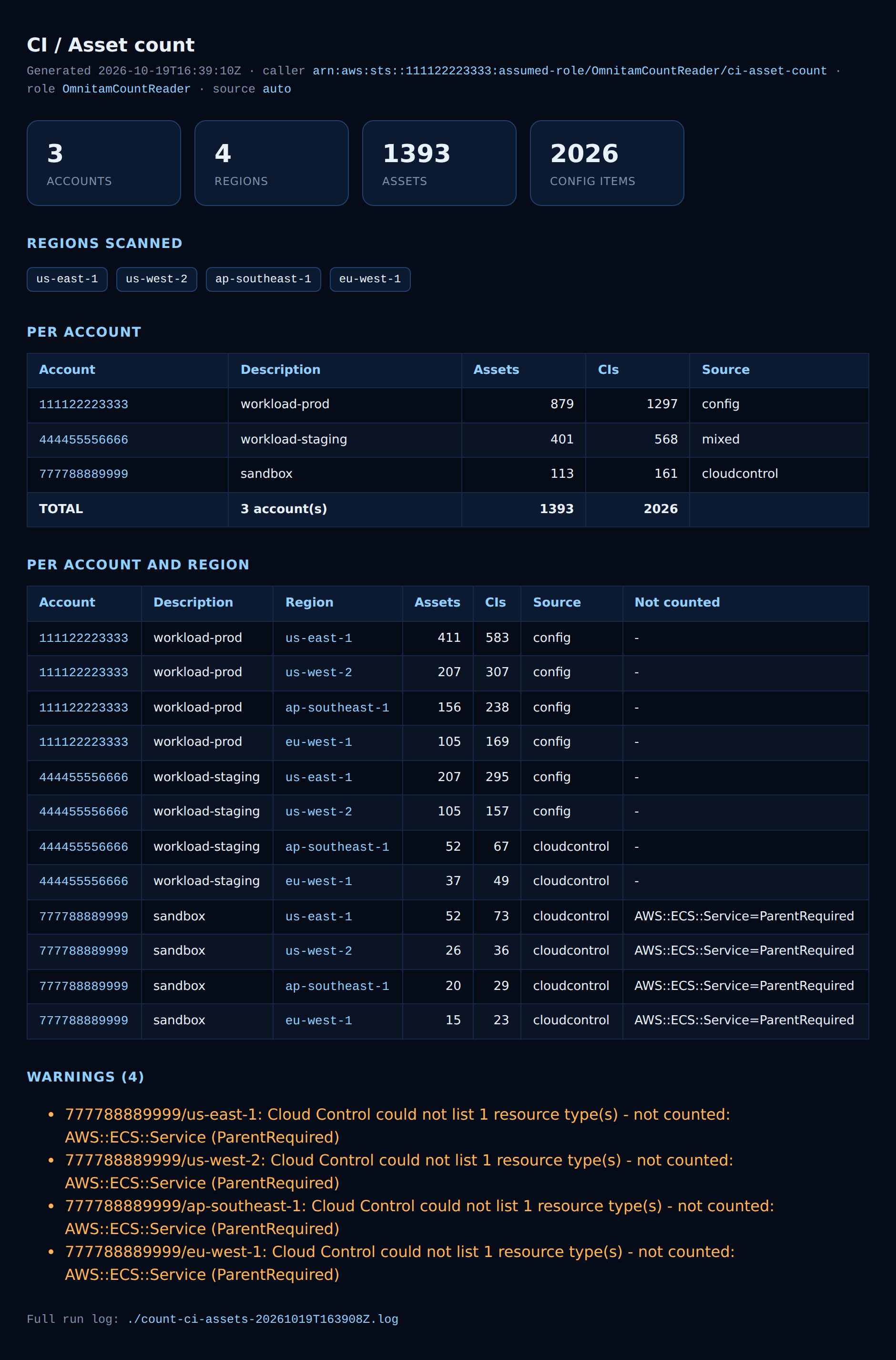
Each run also writes a self-contained HTML report and prints its file:// link. The report opens with summary tiles (accounts, regions, Assets, Config Items), then the regions scanned, a per-account table, a per-account-and-region breakdown, and any warnings, so the numbers are easy to read and share:
One call for the whole per-account split: GET /v1/connectors/<id>/health/dimensions?dimension=account returns the live Asset and CI counts for every account a connector covers. And dimension=region or dimension=resource break the same totals down by region or resource type.
See your own CI and Asset counts.
Connect one AWS account read-only and watch every resource classify itself, Asset, CI, or both, in under an hour.